Time series transformation

Time series transformation is part of:
  • Time Time series analysis software

  • System configuration

    • Windows:
      • Versions: 9x/Me/NT/2000/XP/Vista/Win 7
      • Excel: 97 and later
      • Processor: 32 or 64 bits
      • Hard disk: 150 Mb
    • Mac OS X:
      • OS: OS X
      • Excel: X, 2004 and 2011
      • Hard disk: 150Mb.

Benefits

  • Easy and user-friendly
    Easy and user-friendly XLSTAT is flawlessly integrated with Microsoft Excel which is the most popular spreadsheet worldwide. This integration makes it one of the simplest available tools to work with as it utilizes the same philosophy as Microsoft Excel. The program is accessible in a dedicated XLSTAT tab. The analyses are grouped into functional menus. The dialog boxes are user-friendly and setting up an analysis is straightforward.
  • Data and results shared seamlessly
    Data and results shared seamlessly One of the greatest advantages of XLSTAT is the way you can share data and results seamlessly. As the results are stored in Microsoft Excel, anyone can access them. There is no need for the receiver to have an XLSTAT license or any additional viewer which makes your team-work easier and more affordable. In addition, results are easily integrable into other Microsoft Office software such as PowerPoint, so that you can create striking presentation in minutes.
  • Modular
    Modular XLSTAT is a modular product. XLSTAT-Pro is a core statistical module of XLSTAT which includes all the mainstream functionalities in statistics and multivariate analysis. More advanced features contained in add-on modules can be added for specific applications. This way you can adapt the software to your needs making the software more cost-efficient.
  • Didactic
    Didactic The results of XLSTAT are organized by analysis and are easy to navigate. Moreover useful information is provided along with the results to assist you in your interpretation.
  • Affordable
    Affordable XLSTAT is a complete and modular analytical solution that can suit any analytical business needs. It is very reasonably priced so that the return of your investment is almost immediate. Any XLSTAT license comes with top level support and assistance.
  • Accessible - Available in many languages
    Accessible - Available in many languages We have ensured XLSTAT is accessible to everyone by making the program available in many languages, including Chinese, English, French, German, Italian, Japanese, Polish, Portuguese and Spanish.
  • Automatable and customizable
    Automatable and customizable Most of the statistical functions available in XLSTAT can be called directly from the Visual Basic window of Microsoft Excel. They can be modified and integrated to more code to fit to the specificity of your domain. Adding tables and plots as well as modifying existing outputs becomes easy. Furthermore, XLSTAT includes some special tools on the dialog boxes to generate automatically the VBA code in order to reproduce your analysis using the VBA editor or to simply load pre-set settings. This effortless automation of routine analysis will be a huge time saver on your part.

XLSTAT offers four different possibilities for transforming a time series Xt into Yt, (t=1,…,n):

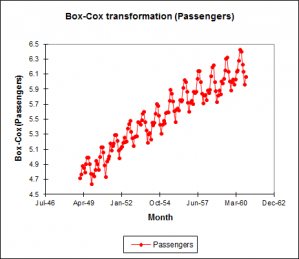
Box-Cox transform (fixed or optimised)

Box-Cox transformation to improve the normality of the time series; the Box-Cox transformation is defined by the following equation:

Yt = [ ( X2t - 1 ) / λ , (Xt > 0, λ ≠ 0 ) or (Xt ≥ 0, λ > 0 ) ; ln( Xt ), (Xt > 0, λ = 0) ]

XLSTAT accepts a fixed value of λ, or it can find the value that maximizes the likelihood of the residuals, the model being a simple linear model with the time as sole explanatory variable.

Differencing (1-B)d(1-Bs)D

Differencing, to remove trend and seasonalities and to obtain stationarity of the time series. The difference equation writes:

Yt = (1-B)d (1-Bs)D Xt

where d is the order of the first differencing component, s is the period of the seasonal component, D is the order of the seasonal component, and B is the lag operator defined by:

BXt = Xt-1

The values of (d, D, s) can be chosen in a trial and error process, or guessed by looking at the descriptive functions (ACF, PACF). Typical values are (1,1,s), (2,1,s). s is 12 for monthly data with a yearly seasonality, 0 when there is no seasonality.

Detrending and deseasonalizing

Detrending and deseasonalizing, using the classical decomposition model which writes:

Xt = mt + st + εt

where mt is the trend component and st the seasonal component, and εt is a N(0,1) white noise component.

XLSTAT allows fitting this model in two separate and/or successive steps:

Detrending by polynomial regression

X t = m t + ε t = Σi=0..k aiti + εt

where k is the polynomial degree. The ai parameters are obtained by fitting a linear model to the data. The transformed time series writes:

Y t = ε t = X t - = Σi=0..p aiti

Desaisonalization by linear model

Xt = st + εt = µ + bi + εt, i = t mod p

where p is the period. The bi parameters are obtained by fitting a linear model to the data. The transformed time series writes: Yt = εt = Xt - µ - bi

Note: there exist many other possible transformations. Some of them are available in the transformations tool of XLSTAT-Pro (see the "Preparing data" section). Linear filters may also be applied. Moving average smoothing methods which are linear filters are available in the "Smoothing" tool of XLSTAT.

Screenshots