Individual charts
Individual control charts allow to follow the quality of a process on one sample. Draw them in Excel using the XLSTAT add-on statistical software.
What is an individual control chart
Individual charts are a type of control chart used to monitor the processes in statistical process control (SPC). Control charts were first mentioned in a document by Walter Shewhart that he wrote during his time working at Bell Labs in 1924. He described his methods completely in his book (1931).
For a long time, there was no significant innovation in the area of control charts. With the development of CUSUM, UWMA and EWMA charts in 1936, Deming expanded the set of available control charts.
Control charts were originally used in area of goods production. Therefore the wording is still from that domain. Today this approach is being applied to a large number of different fields, for instance services, human resources, and sales. In the following lines, we use the wording from the production and shop floors.
Individual control charts in XLSTAT
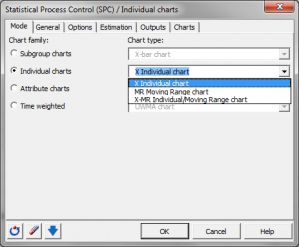
The individual charts tool offers you the following chart types alone or in combination:
- X Individual: An X individual chart is useful to follow the moving average of a production process. Mean shifts are easily visible in the diagrams.
- MR moving range: An MR chart (moving range diagram) is useful to analyze the variability of the production. Large difference in production, caused by the use of different production lines, will be easily visible.
Note 1: If you want to investigate smaller mean shifts, then you can also use CUSUM individual charts which are often preferred in comparison with the individual control charts, because they can detect smaller mean shifts.
Note 2: If you have more than one measurement for each point in time, then you should use the control charts for subgroups.
Note 3: If you have measurements in qualitative values (for instance ok, not ok, conform not conform), then use the control charts for attributes.
XLSTAT Individual charts option offers you the following options for the estimation of the standard deviation (sigma) of the data set, given n measurements:
- Average moving range: The estimator for sigma is calculated based on the average moving range using a window length of m measurements. Ŝ = m / d2, where d2 is the control chart constant according to Burr (1969).
- Median moving range: The estimator for sigma is calculated based on the median of the moving range using a window length of m measurements. Ŝ = median / d4, where d4 is the control chart constant according to Burr (1969).
- standard deviation: The estimator for sigma is calculated based on the standard deviation of the n measurements. Ŝ = s / c4, where c4 is the control chart constant according to Burr (1969).
Process capability
Process capability describes a process and informs if the process is under control and the distribution of the measured variables are inside the specification limits of the process. If the distributions of the measured variables are in the technical specification limits, then the process is called "capable".
Note: During the interpretation of the different indicators for the process capability please pay attention to the fact that some indicators suppose normality or at least symmetry of the distribution of the measured values. By the use of a normality test, you can verify these premises (see the Normality Tests in XLSTAT-Base).
If the data are not normally distributed, you have the following possibilities to obtain results for the process capabilities. Use the Box-Cox transformation to improve the normality of the data set. Then verify again the normality using a normality test. Use the process capability indicator Cp 5.5.
Once the capability is computed, a table contains the following indicators for the process capability and if possible the corresponding confidence intervals: Cp, Cpl, Cpu, Cpk, Pp, Ppl, Ppu, Ppk, Cpm, Cpm (Boyle), Cp 5.5, Cpk 5.5, Cpmk, and Cs (Wright).
For Cp, Cpl, and Cpu, information about the process performance is supplied and for Cp a status information is given to facilitate the interpretation.
Interpretation of the Cp
- Cp values have the following status based on Ekvall and Juran (1974):
- "not adequate" if Cp < 1
- "adequate" if 1 ≤ Cp ≤ 1.33
- "more than adequate" if Cp > 1.33
- Based on Montgomery (2001), Cp needs to have the following minimal values for the process performance to be as expected:
- 1.33 for existing processes
- 1.50 for new processes or for existing processes when the variable is critical
- 1.67 for new processes when the variable is critical
- Based on Montgomery (2001), Cpu and Cpl need to have the following minimal values for process performance to be as expected:
- 1.25 for existing processes
- 1.45 for new processes or for existing processes when the variable is critical
- 1.60 for new processes when the variable is critical
Chart rules
XLSTAT offers you the possibility to apply rules for special causes and Westgard rules on the data set. Two sets of rules are available in order to interpret control charts. You can activate and deactivate separately the rules in each set.
Test special causes:
- 1 point more than 3s from center line
- 9 points in a row on same side of center line
- 6 points in a row, all increasing or all decreasing
- 14 points in a row, alternating up and down
- 2 out of 3 points > 2s from center line (same side)
- 4 out of 5 points > 1s from center line (same side)
- 15 points in a row within 1s of center line (either side)
- 8 points in a row > 1s from center line (either side)
Apply Westgard rules:
- Rule 1 2s
- Rule 1 3
- Rule 2 2s
- Rule 4s
- Rule 4 1s
- Rule 10 X
Plots for individual charts in XLSTAT
The following results are displayed separately for each requested chart. Charts can be selected alone or in combination with the X individual chart.
- X Individual / MR moving range table: This table contains information about the center line and the upper and lower control limits of the selected chart. There will be one column for each phase.
- Observation details: This table displays detailed information for each observation. For each observation, the corresponding phase, the mean or median, the center line, the lower and upper control limits are displayed. If the information about the zones A, B and C are activated, then the lower and upper control limits of the zones A and B are displayed as well.
- Rule details: If the rules options are activated, a detailed table about the rules will be displayed. For each observation, there is one row for each rule that applies. "Yes" indicates that the corresponding rule was fired, and "No" indicates that the rule does not apply.
- X Individual / MR moving range Chart: If the charts are activated, then a chart containing the information of the two tables above is displayed. Each observation is displayed. The center line and the lower and upper control limits are displayed as well. If the corresponding options have been activated, the lower and upper control limits for the zones A and B are included and there are labels for the observations for which rules were fired. A legend with the activated rules and the corresponding rule number is displayed below the chart.

