Univariate plots

"Univariate plots" es parte de :
  • Pro Software estadístico básico

  • Configuración del sistema

    • Windows:
      • Versiones: 9x/Me/NT/2000/XP/Vista/Win 7
      • Excel: 97 o superior
      • Procesador: 32 o 64 bits
      • Disco duro: 150 Mb
    • Mac OS X:
      • OS: OS X
      • Excel: X, 2004 y 2011
      • Disco duro: 150 Mb

Ventajas

  • Sencillo y dirigido a los usuarios
    Sencillo y dirigido a los usuarios XLSTAT es un software que se integra de forma transparente con Microsoft Excel, que es la hoja de cálculo más difundida del mundo. Esta integración hace que sea una de las herramientas más sencillas para trabajar ya que utiliza la misma filosofía que Microsoft Excel. El programa está disponible en una ficha de XLSTAT. Los análisis se agrupan en menús funcionales. Los cuadros de diálogo están dirigidos a los usuarios, por lo que la preparación de los análisis es tarea sencilla.
  • Resultados y datos compartidos sin dificultad
    Resultados y datos compartidos sin dificultad Una de las mayores ventajas de XLSTAT es la forma transparente con la que se pueden compartir los datos y los resultados. Los resultados se almacenan en Microsoft Excel de modo que cualquier usuario puede acceder a ellos. No es necesario que el destinatario tenga una licencia de XLSTAT o cualquier visor adicional, lo que facilita y rentabiliza el trabajo en equipo. Del mismo modo, es fácil integrar los resultados en otras aplicaciones de Microsoft Office, como PowerPoint, por lo que se pueden crear estupendas presentaciones en cuestión de minutos.
  • Modular
    Modular XLSTAT es un producto modular. XLSTAT-Pro es un módulo principal de estadística de XLSTAT, que incluye todas las funcionalidades dominantes en el análisis estadístico y multivariado. Es posible añadir funciones más avanzadas por medio de módulos complementarios para aplicaciones específicas. De este modo es posible adaptar el software a sus necesidades, aumentando la rentabilidad.
  • Didáctico
    Didáctico Los resultados de XLSTAT están organizados por análisis y es fácil desplazarse por ellos. La información útil se proporciona junto con los resultados para ayudarle en su interpretación.
  • Asequible
    Asequible XLSTAT es una solución completa y modular que se puede ajustar a cualquier necesidad de análisis comercial. Tiene un precio muy razonable, por lo que el retorno de su inversión es casi inmediato. Todas las licencias de XLSTAT incluyen también un servicio de asistencia de la mayor calidad.
  • Accesible: disponible en muchos idiomas
    Accesible: disponible en muchos idiomas Nos hemos asegurado de que XLSTAT sea accesible para todos traduciendo el programa a muchos idiomas, incluyendo chino, inglés, alemán, italiano, japonés, polaco, portugués y español.
  • Automatizable y personalizable
    Automatizable y personalizable La mayoría de las funciones estadísticas disponibles en XLSTAT pueden llamarse directamente desde la ventana Visual Basic de Microsoft Excel. Pueden modificarse e integrarse en código fuente adicional para ajustarse a sus necesidades. Añadir tablas y trazados, así como modificar los resultados existentes se convierte en tarea sencilla. Además, XLSTAT incluye algunas herramientas especiales en los cuadros de diálogo para generar automáticamente el código fuente VBA para reproducir su análisis empleando el editor de VBA o simplemente cargar ajustes predeterminados. Esta automatización de análisis rutinarios sin esfuerzo le ahorrará gran cantidad de tiempo.

Before using advanced analysis methods you must first of all reveal the data in order to identify trends, locate anomalies or simply have available essential information such as the minimum, maximum or mean of a data sample.

XLSTAT offers you a large number of descriptive statistics and charts which give you a useful and relevant preview of your data.

Although you can select several variables (or samples) at the same time, XLSTAT calculates all the descriptive statistics for each of the samples independently. Several types of chart are available.

Charts for quantitative data

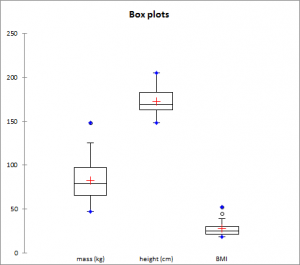
Box plot

Also called "box and whisker diagram". It is a simple and quite complete representation since in the version provided by XLSTAT the minimum, 1st quartile, median, mean and 3rd quartile are displayed together with both the limits (the ends of the "whiskers") beyond which values are considered anomalous.

Scattergram

It gives an idea of the distribution and possible plurality of the modes of a sample. All points are represented together with the mean and the median.

Strip plot

It represents the data from the sample as strips. For a given interval, the thicker or more tightly packed the strips, the more data there is.

P-P Chart (Normal distribution)

P-P chart (for Probability-Probability) is used to compare the empirical distribution function of a sample with that of a normal variable for the same mean and deviation. If the sample follows a normal distribution, the data will lie along the first bisector of the plan.

Q-Q Chart (Normal distribution)

Q-Q chart (for Quantile-Quantile) is used to compare the quantities of the sample with that of a normal variable for the same mean and deviation. If the sample follows a normal distribution, the data will lie along the first bisector of the plan.

Charts for qualitative data

Bar chart

It represents the frequencies or relative frequencies of the various categories of qualitative variables as bars.

Pie chart

It represents the frequencies or relative frequencies of the various categories of qualitative variables as pie charts.

Double pie chart, Doughnut, Stacked bars and Multiple bars

Those plots are used to compares the frequencies or relative frequencies of sub-samples with those of the complete sample.

Vorschau