Statistical Power for proportion comparison
Ensure optimal power or sample size using power analysis. Power for the comparison of proportions available in Excel using the XLSTAT statistical software.
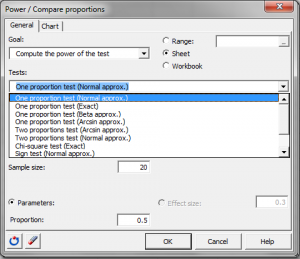
Statistical Power analysis for the comparison of proportions in XLSTAT
XLSTAT includes parametric tests and nonparametric tests to compare proportions. Thus we can use the z-test (for one or two proportions), chi-square test, the sign test or the McNemar test. XLSTAT can calculate the power or the number of observations necessary for these tests using either exact methods or approximations. When testing a hypothesis using a statistical test, there are several decisions to take:
- The null hypothesis H0 and the alternative hypothesis Ha.
- The statistical test to use.
- The type I error also known as alpha. It occurs when one rejects the null hypothesis when it is true. It is set a priori for each test and is 5%.
The type II error or beta is less studied but is of great importance. In fact, it represents the probability that one does not reject the null hypothesis when it is false. We cannot fix it up front, but based on other parameters of the model we can try to minimize it. The power of a test is calculated as 1-beta and represents the probability that we reject the null hypothesis when it is false. We therefore wish to maximize the power of the test. XLSTAT is able to calculate the power (and beta) when other parameters are known. For a given power, it also allows to calculate the sample size that is necessary to reach that power.
The statistical power calculations are usually done before the experiment is conducted. The main application of power calculations is to estimate the number of observations necessary to properly conduct an experiment. XLSTAT allows you to compare:
- A proportion to a test proportion (z-test with different approximations).
- Two proportions (z-test with different approximations).
- Proportions in a contingency table (chi-square test).
- Proportions in a nonparametric way (the sign test and the McNemar test)
Calculations for the Statistical Power of tests comparing proportions
The power of a test is usually obtained by using the associated non-central distribution. For this specific case we will use an approximation in order to compute the power.
Comparing a proportion to a test proportion
The alternative hypothesis in this case is: Ha: p1 – p0 ≠ 0 Various approximations are possible:
- Approximation using the normal distribution: In this case, we will use the normal distribution with means p0 and p1 and standard deviations √ p0 (1- p0) / N and √p1 (1- p1) / N
- Exact calculation using the binomial distribution with parameters √ p0 (1- p0) / N and √p1 (1- p1) / N
- Approximation using the beta distribution with parameters ((N-1)p0 ; (N-1)(1-p0)) and ((N-1)p1 ; (N-1)(1-p1))
- Approximation using the method of the arcsin: This approximation is based on the arcsin transformation of proportions: H(p0) and H(p1). The power is obtained using the normal distribution: Zp = √N( H(p0) - H(p1)) – Zreq, with Zreq being the alpha-quantile of the normal distribution.
Comparing two proportions
The alternative hypothesis in this case is: Ha: p1 – p2 ≠ 0 Various approximations are possible:
- Approximation using the method of the arcsin: This approximation is based on the arcsin transformation of proportions: H(p1) and H(p2). The power is obtained using the normal distribution: Zp = √N( H(p1) - H(p2)) – Zreq, with Zreq being the alpha-quantile of the normal distribution.
- Approximation using the normal distribution: In this case, we will use the normal distribution with means p1 and p2 and standard deviations: √ p1 (1- p1) / N and √ p2 (1- p2) / N
Chi-square test
To calculate the power of the chi-square test in the case of a contingency table 2 * 2, we use the non-central chi-square distribution with the value of the chi-square as non-centrality parameter. It therefore seeks to see whether two groups of observations have the same behavior based on a binary variable. We have:
| Group 1 | Group 2 | |
| Positive | p1 | p2 |
| Negative | 1-p1 | 1-p2 |
p1 N1 and N2 have to be entered in the dialog box (p2 can be found from other parameters because the test has only one degree of freedom).
Sign test
The sign test is used to see if the proportion of cases in each group is equal to 50%. It has the same principle as the one proportion test against a constant, the constant being 0.5. Power is computed using an approximation by the normal distribution or an exact method with the binomial distribution. We must therefore enter the sample size and the proportion in one group p1 (the other proportion is such that p2=1-p1).
McNemar test
The McNemar test on paired proportions is a specific case of testing a proportion against a constant. Indeed, one can represent the problem with the following table:
| Group 1 | Group 2 | |
| Positive | PP | PN |
| Negative | P | NN |
We have PP + NN + PN + NP = 1. We want to try to see the effect of a treatment; we are therefore interested in NP and PN. The other values are not significant.
The test inputs are: Proportion1= NP and Proportion 2 = PN, with necessarily P1+P2 < 1.
The effect is calculated only on a percentage of NP + PN of the sample. The proportion of individuals that change from negative to positive is calculated as NP / (NP + NP). So we will try to compare this figure to a value of 50% to see if we have more individuals who go from positive to negative than individuals who go from negative to positive.
This test is well suited for medical applications.
Calculating sample size using the statistical power of a test
To calculate the number of observations required, XLSTAT uses an algorithm that searches for the root of a function. It is called the Van Wijngaarden-Dekker-Brent algorithm (Brent, 1973). This algorithm is adapted to the case where the derivatives of the function are not known. It tries to find the root of:
power (N) - expected_power
We then obtain the size N such that the test has a power as close as possible to the desired power.


analyze your data with xlstat
Related features