Monte Carlo simulations
Monte Carlo simulations are a key decision making tool in statistical risk analysis of models which may contain uncertain values. In Excel using XLSTAT.
What is a Monte Carlo Simulation in XLSTAT?
Monte Carlo Simulation is a module that allows building and computing simulation models, an innovative method for estimating variables, whose exact value is not known, but that can be estimated by means of repeated simulation of random variables that follow certain theoretical laws. Before running the model, you need to create the model, defining a series of input and output (or result) variables.
Simulation models allow us to obtain information, such as mean or median, on variables that do not have an exact value, but for which we can know, assume or compute a distribution. If some "result" variables depend of these "distributed" variables by the way of known or assumed formulae, then the "result" variables will also have a distribution. XLSTAT-Sim allows you to define the distributions, and then obtain through simulations an empirical distribution of the input and output variables as well as the corresponding statistics.
Simulation models are used in many areas such as finance and insurance, medicine, oil and gas prospecting, accounting, or sales prediction.
Four elements are involved in the construction of a simulation model:
Distributions are associated with random variables. XLSTAT gives a choice of more than 20 distributions to describe the uncertainty of the values that a variable can take. For example, you can choose a triangular distribution if you have a quantity for which you know it can vary between two bounds, but with a value that is more likely (a mode). At each iteration of the computation of the simulation model, a random draw is performed in each distribution that has been defined.
Scenario variables allow to include in the simulation model a quantity that is fixed in the model, except during the tornado analysis where it can vary between two bounds.
Result variables correspond to the outputs of the model. They depend either directly or indirectly, through one or more Excel formulae, on the random variables to which distributions have been associated and if available on the scenario variables. The goal of computing the simulation model is to obtain the distribution of the result variables.
Statistics allow tracking a given statistic as a result variable. For example, we might want to monitor the standard deviation of a result variable.
A correct model should comprise at least one distribution and one result. Models can contain any number of these four elements.
A model can be limited to a single Excel sheet or can use a whole Excel folder.
Simulation models can take into account the dependencies between the input variables described by distributions. If you know that two variables are usually related such that the correlation coefficient between them is 0.4, then you want that, when you do simulations, the sampled values for both variables have the same property. This is possible in XLSTAT-Sim by entering in the Run dialog box the correlation or covariance matrix between some or all the input random variables used in the model.
How to configure a Monte Carlo Simulation in XLSTAT?
General tab:
Model limited to This option allows defining the size of the active simulation model. Limit if possible your model to a single Excel sheet. The following options are available:
Sheet: Only the simulation functions in the active Excel sheet will be used in the simulation model. The other sheets are ignored.
Workbook: All the simulation functions of the active workbook are included in the simulation model. This option allows using several Excel sheets for one model.
Sampling method: This option allows choosing the method of sample generation. Two possibilities are available:
Classic: The samples are generated using Monte Carlo simulations.
Latin hypercubes: The samples are generated using the Latin Hypercubes method. This method divides the distribution function of the variable into sections that have the same size and then generates equally sized samples within each section. This leads to faster convergence of the simulation. You can enter the number of sections. The default value is 500.
Single step memory: Enter the maximum number of simulation steps that will be stored in the single step mode in order to calculate the statistics fields. When the limit is reached, the window moves forward (the first iteration is forgotten and the new one is stored). The default value is 500. This value can be larger, if necessary.
Number of iterations by step: Enter the value of the number of simulation iterations that are performed during one step. The default value is 1.
Format tab:
Use these options to set the format of the various model elements that are displayed on the Excel sheets:
Distributions: You can define the color of the font and the color of the background of the cells where the definition of the input random variables and their corresponding distributions are stored.
Scenario variables: You can define the color of the font and the color of the background of the cells where the scenario variables are stored.
Result variables: You can define the color of the font and the color of the background of the cells where the result variables are stored.
Statistics: You can define the color of the font and the color of the background of the cells where the statistics are stored.
Convergence tab:
Stop conditions: Activate this option to stop the simulation if the convergence criteria are reached.
Criterion: Select the criterion that should be used for testing the convergence. There are three options available:
Mean: The means of the monitored "result variables" (see below) of the simulation model will be used to check if the convergence conditions are met.
Standard deviation: The standard deviation of the monitored "result variables" (see below) of the simulation model will be used to check if the convergence conditions are met.
Percentile: The percentiles of the monitored "result variables" (see below) of the simulation model will be used to check if the convergence conditions are met. Choose the Percentile to be used. The default value is 90%.
Test frequency: Enter the number of iterations to perform before the convergence criteria are checked again. Default value: 100.
Convergence: Enter the value in % of the evolution of the convergence criteria from one check to the next, which, when reached, means that the algorithm has converged. Default value: 3%.
Confidence interval (%): Enter the size in % of the confidence interval that is computed around the selected criterion. The upper bound of the interval is compared to the convergence value defined above, in order to determine if the convergence is reached or not. Default value: 95%.
Monitored results: Select which result variables of the simulation model should be monitored for the convergence. There are two options available:
All result variables: All result variables of the simulation model will be monitored during the convergence test.
Activated result variables: Only result variables that have their ConvActive parameter equal to 1 are monitored.
References tab:
Reference to Excel cells: Select the way references to names of variables to the simulation models are generated:
Absolute reference: XLSTAT creates absolute references (for example $A$4) to the cell.
Relative reference: XLSTAT creates absolute references (for example A4) to the cell.
Note: The absolute reference will not be changed if you copy and paste the XLSTAT_Sim formula, contrary to the relative reference.
Results tab:
Filter level for results: Select the level of details that will be displayed in the report. This controls for the descriptive statistics tables and the histograms of the different model elements:
All: Details are displayed for all elements of the model.
Activated: Details are only displayed for the elements that have a value of the Visible parameter set to 1.
None: No detail will be displayed for the elements of the model.
Which are the results of a Monte Carlo Simulation in XLSTAT?
When you run the model, a series of results are displayed. While giving the critical statistics such are information on the distribution of the input and result variables, it also allows interpreting relationships between variables. Sensitivity analysis is also available if scenario variables have been included.
Descriptive statistics
The report that is generated after the simulation contains information on the distributions of the model. The user may choose from a range of descriptive statistics the most important indicators that should be integrated into the report in order to easily interpret the results. A selection of charts is also available to graphically display the relationships.
Details and formulae relative to the descriptive statistics are available in the description section of the Descriptive statistics tool of XLSTAT.
Correlations
Once the computations are over, the simulation report may contain information on the correlations between the different variables included in the simulation model. Three different correlation coefficients are available:
Pearson correlation coefficient: This coefficient corresponds to the classical linear correlation coefficient. This coefficient is well suited for continuous data. Its value ranges from -1 to 1, and it measures the degree of linear correlation between two variables. Note: the squared Pearson correlation coefficient gives an idea of how much of the variability of a variable is explained by the other variable. The p-values that are computed for each coefficient allow testing the null hypothesis that the coefficients are not significantly different from 0. However, one needs to be cautious when interpreting these results, as if two variables are independent, their correlation coefficient is zero, but the reciprocal is not true.
Spearman correlation coefficient (rho): This coefficient is based on the ranks of the observations and not on their value. This coefficient is adapted to ordinal data. As for the Pearson correlation, one can interpret this coefficient in terms of variability explained, but here we mean the variability of the ranks.
Kendall correlation coefficient (tau): As for the Spearman coefficient, it is well suited for ordinal variables as it is also based on ranks. However, this coefficient is conceptually very different. It can be interpreted in terms of probability: it is the difference between the probabilities that the variables vary in the same direction and the probabilities that the variables vary in the opposite direction. When the number of observations is lower than 50 and when there are no ties, XLSTAT gives the exact p-value. If not, an approximation is used. The latter is known as being reliable when there are more than 8 observations.
Sensitivity analysis
The sensitivity analysis displays information about the impact of the different input variables on one output variable. Based on the simulation results and on the correlation coefficient that has been chosen (see above), the correlations between the input random variables and the result variables are calculated and displayed in a declining order of impact on the result variable.
Tornado and spider analyses
Tornado and spider analyses are not based on the iterations of the simulation but on a point-by-point analysis of all the input variables (random variables with distributions and scenario variables).
During the tornado analysis, for each result variable, each input random variable and each scenario variable are studied one by one. We make their value vary between two bounds and record the value of the result variable in order to know how each random and scenario variable impacts the result variables. For a random variable, the values explored can either be around the median or around the default cell value, with bounds defined by percentiles or deviation. For a scenario variable, the analysis is performed between two bounds specified when defining the variables. The number of points is an option that can be modified by the user before running the simulation model.
The spider analysis does not only display the maximum and minimum change of the result variable, but also the value of the result variable for each data point of the random and scenario variables. This is useful to check if the dependence between distribution variables and result variables is monotonous or not.
Which charts are displayed for a Monte Carlo Simulation in XLSTAT?
The following charts are available to display information on the variables:
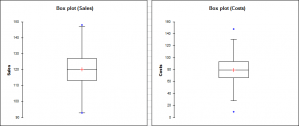
Box plots: These univariate representations of quantitative data samples are sometimes called "box and whisker diagrams". It is a simple and quite complete representation since in the version provided by XLSTAT the minimum, 1-st quartile, median, mean and 3-rd quartile are displayed together with both limits (the ends of the "whiskers") beyond which values are considered anomalous. The mean is displayed with a red +, and a black line corresponds to the median.
Scattergrams: These univariate representations give an idea of the distribution and possible plurality of the modes of a sample. All points are represented together with the mean and the median.
P-P Charts (normal distribution): P-P charts (for Probability-Probability) are used to compare the empirical distribution function of a sample with that of a normal variable for the same mean and deviation. If the sample follows a normal distribution, the data will lie along the first bisector of the plan.
Q-Q Charts (normal distribution): Q-Q charts (for Quantile-Quantile) are used to compare the quantities of the sample with that of a normal variable for the same mean and deviation. If the sample follows a normal distribution, the data will lie along the first bisector of the plan.

