Histograms

Histograms is part of:
  • Pro Core statistical software

  • System configuration

    • Windows:
      • Versions: 9x/Me/NT/2000/XP/Vista/Win 7
      • Excel: 97 and later
      • Processor: 32 or 64 bits
      • Hard disk: 150 Mb
    • Mac OS X:
      • OS: OS X
      • Excel: X, 2004 and 2011
      • Hard disk: 150Mb.

Benefits

  • Easy and user-friendly
    Easy and user-friendly XLSTAT is flawlessly integrated with Microsoft Excel which is the most popular spreadsheet worldwide. This integration makes it one of the simplest available tools to work with as it utilizes the same philosophy as Microsoft Excel. The program is accessible in a dedicated XLSTAT tab. The analyses are grouped into functional menus. The dialog boxes are user-friendly and setting up an analysis is straightforward.
  • Data and results shared seamlessly
    Data and results shared seamlessly One of the greatest advantages of XLSTAT is the way you can share data and results seamlessly. As the results are stored in Microsoft Excel, anyone can access them. There is no need for the receiver to have an XLSTAT license or any additional viewer which makes your team-work easier and more affordable. In addition, results are easily integrable into other Microsoft Office software such as PowerPoint, so that you can create striking presentation in minutes.
  • Modular
    Modular XLSTAT is a modular product. XLSTAT-Pro is a core statistical module of XLSTAT which includes all the mainstream functionalities in statistics and multivariate analysis. More advanced features contained in add-on modules can be added for specific applications. This way you can adapt the software to your needs making the software more cost-efficient.
  • Didactic
    Didactic The results of XLSTAT are organized by analysis and are easy to navigate. Moreover useful information is provided along with the results to assist you in your interpretation.
  • Affordable
    Affordable XLSTAT is a complete and modular analytical solution that can suit any analytical business needs. It is very reasonably priced so that the return of your investment is almost immediate. Any XLSTAT license comes with top level support and assistance.
  • Accessible - Available in many languages
    Accessible - Available in many languages We have ensured XLSTAT is accessible to everyone by making the program available in many languages, including Chinese, English, French, German, Italian, Japanese, Polish, Portuguese and Spanish.
  • Automatable and customizable
    Automatable and customizable Most of the statistical functions available in XLSTAT can be called directly from the Visual Basic window of Microsoft Excel. They can be modified and integrated to more code to fit to the specificity of your domain. Adding tables and plots as well as modifying existing outputs becomes easy. Furthermore, XLSTAT includes some special tools on the dialog boxes to generate automatically the VBA code in order to reproduce your analysis using the VBA editor or to simply load pre-set settings. This effortless automation of routine analysis will be a huge time saver on your part.

Histogram use

The histogram is one of the most frequently used display tools as it gives a very quick idea of the distribution of a sample of continuous or discrete data.

Histogram types

XLSTAT offers several options to create the histogram that will suit better your data:

  1. Intervals definition To make it easier to obtain histograms, XLSTAT lets you create histograms either by defining the number of intervals, their width or by specifying the intervals yourself. The intervals are considered as closed for the lower bound and open for the upper bound.
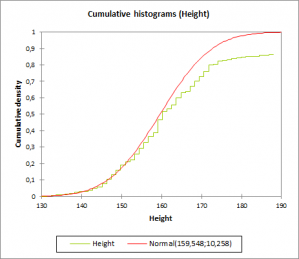
  2. Cumulative histogram Create cumulative histograms either by cumulating the values of the histogram or by using the empirical cumulative distribution.
  3. Comparison to a theoretical distribution XLSTAT lets you compare the histogram with a theoretical distribution whose parameters have been set by you. However, if you want to check if a sample follows a given distribution, you can use the distribution fitting tool to estimate the parameters of the distribution and if necessary check if the hypothesis is acceptable.

Distribution to be added to a histogram

XLSTAT provides the following distributions:

Tutorials

Screenshots